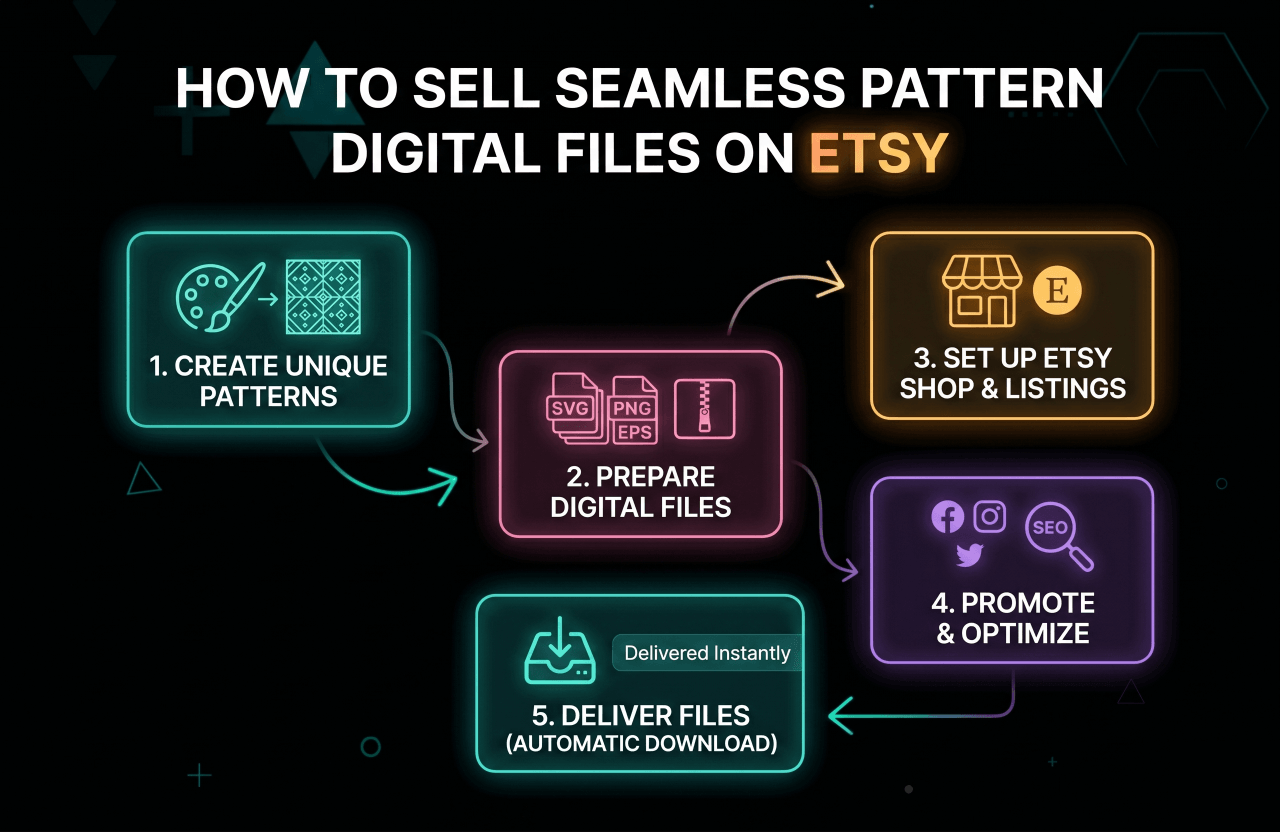
Look around you for a second. That coffee cup you're holding? The phone case on your desk? Probably covered in a repeating design. Seamless patterns are literally everywhere right now. And honestly? If you've got an ounce of creativity, sitting on your designs instead of tossing them up on Etsy in 2026 is leaving money on the table. Pure and simple passive income.
But here's the catch: taking a cool doodle and morphing it into a shop that actually rings the cash register isn't pure magic. People always ask me: "What file types do these buyers actually want?" or "How on earth do I not get buried under a million other sellers?" Valid questions.
Consider this your ultimate, no-BS playbook. Doesn't matter if you're a hardcore surface designer or just someone messing around on an iPad while watching Netflix. We're going to break down the exact steps to build an Etsy storefront that actually brings in profit.
Pro tip: Think of these files as the ultimate "set it and forget it" gig. You do the heavy lifting exactly once. After that? Your shop is making sales at 3 AM while you sleep. No packing tape. No post office runs. You just have to give the people what they're already searching for.
Why Sell Seamless Patterns on Etsy?
Let's ditch the old idea that Etsy is just for grandmas selling knitted scarves. It's a powerhouse. Over the past couple of years, the hunger for digital downloads, specifically files that tile seamlessly, has gone completely insane. Small business owners and crafters eat this stuff up.
- Zero startup headaches: Seriously, wave goodbye to hoarding inventory or crying over shipping fees.
- Built-in traffic: You're tapping into millions of shoppers who already have their credit cards linked and ready to go.
- True passive cash: We said it before, but it bears repeating. Sell the same file a thousand times. The ceiling doesn't exist.
- You call the shots: Want to draw neon dinosaurs or moody vintage florals? Do it. You're the boss here.
- It scales fast: What starts as a weekend hobby can snowball into paying your rent as your catalog grows.
Did you know? If you peek at Etsy’s 2025 Marketplace Insights, you'll see digital patterns stubbornly holding their ground in the top 10 fastest-growing categories. The buyer pool is wild, from bored housewives to massive commercial operations.
Understanding Seamless Patterns and Their Uses
In plain English? A seamless pattern is a graphic that loops forever. Stack copies of it side-by-side, top-to-bottom, and you won't spot a single clunky edge. People scoop these up to make:
- Custom fabric runs (places like Spoonflower or Printful are huge for this)
- Those aesthetic planner stickers and digital scrapbooks
- Trendy peel-and-stick wallpaper or custom gift wrapping
- Cohesive Instagram feeds and slick website backgrounds
- Merch! Think tumblers, tote bags, and tees
- Basically, any random DIY craft you can dream up on a Sunday afternoon
Because one single file can be used in a hundred different ways, the demand is relentless. Designers and crafters are constantly refreshing the site looking for their next obsession.
Further reading: Tech stuff stressing you out? Don't panic. Adobe actually put together a really solid breakdown on creating seamless patterns in Illustrator. Definitely worth a bookmark.
Step 1: Research the Etsy Market and Find Your Niche
Please, I am begging you: do not just open a blank canvas and start drawing randomly. You need to do a little recon first to figure out what people actually want to buy. A little homework now saves you from crickets later.
How to Research Seamless Pattern Trends on Etsy
- Start typing stuff like "retro repeat pattern" or "seamless digital download" into the search bar. Watch what auto-fills. That right there? That's your gold.
- Snoop on the shops that are crushing it. Notice any recurring color palettes? What's the general vibe?
- Look at the review dates. Tons of recent reviews means people are actively buying that style right now.
- Let the search bar be your personal crystal ball.
- Go get lost down a Pinterest or TikTok rabbit hole. A lot of visual trends blow up there way before they ever hit Etsy.
Pro tip: Stop guessing. Use heavy-hitter SEO tools like eRank and Marmalead to pull the actual, hard data on what shoppers are typing.
Choosing Your Niche
Throwing spaghetti at the wall to see what sticks is a terrible strategy. Carving out a specific, weird little corner of the market builds a loyal fanbase. Some highly profitable niches:
- Dark, moody academia botanicals
- Gender-neutral, earthy nursery vibes
- Funky, 70s-inspired geometric blobs
- Ugly sweater holiday prints
- Messy, organic watercolor smudges
- Ultra-clean, Scandinavian minimalism
The ultimate hack? Finding the sweet spot where the stuff you actually enjoy drawing overlaps with what the search data says is selling.
Step 2: Design High-Quality Seamless Patterns
Okay, time for the fun stuff. But listen, if you want to charge real money, you need to use tools that don't output pixelated garbage. Here is what the pros are rocking:
- Adobe Illustrator: The undisputed heavyweight champ. It spits out vectors, meaning someone could blow your design up to fit a billboard and it would stay razor-sharp.
- Adobe Photoshop: Your go-to if you're heavily into hand-painted textures or complex, blended watercolors.
- Procreate: The absolute favorite for the iPad crowd who want that organic, sketching-on-the-couch experience.
- Affinity Designer: A beast of a program that only charges you once. A lifesaver if you hate monthly software subscriptions.
Tips for Creating Seamless Patterns
- Test the repeat. I can't stress this enough. Tile it a bunch of times on your screen to catch any weird gaps or clumps before you upload.
- Resolution is king. Do not dip below 300 DPI, or your buyers will end up with blurry prints. A 12x12 inch canvas (3600x3600 pixels) is the industry standard.
- Squeeze every drop of value out of your art! Change up the color palette and suddenly you have three new products from one design.
- Name your layers. Seriously. Future-you will be incredibly grateful when you need to make a quick edit six months from now.
Further reading: Feeling like a total newbie? Go read our breakdown on creative digital skills for beginners to brush up on the basics.
Step 3: Prepare Your Files for Etsy
Handing over the right files is how you avoid a flooded inbox of angry customer messages. You want this to be totally foolproof.
Best File Formats for Seamless Patterns
- JPEG: The classic crowd-pleaser. Works for almost everyone, provided you exported it nice and crisp at 300 DPI.
- PNG: Absolutely crucial if your design has a clear background. This lets buyers slap your pattern over whatever base color they want.
- SVG/EPS: The holy grail for crafters and pros who want to tear your design apart and tweak the raw shapes.
- PDF: Super handy for the less tech-savvy folks who just want to click "print" and be done with it.
Organizing Your Digital Downloads
- Shove everything into a clean, obviously-named ZIP file. Make it a one-click process.
- Toss in a quick "Read Me" text file. Say thanks, and clearly state what they can and absolutely cannot do with your artwork.
- Be your own QA tester. Download and unzip your own files just to make sure they aren't corrupted.
Tip: Definitely slap a big, obnoxious watermark over your listing photos so people don't steal them. But obviously, make sure the files they actually pay for are 100% clean.
Step 4: Set Up Your Etsy Shop for Digital Patterns
Never sold anything on the internet before? Take a deep breath. Getting the doors open is actually pretty painless:
- Open up your official seller account.
- Brainstorm a shop name that isn't impossible to spell (and maybe check if the dot-com is available, just in case you blow up later).
- Throw up a banner and a logo that instantly communicates your vibe.
- Fill out your shop policies. Do not skip this. Make your "no refunds on digital items" rule crystal clear.
- When you make your listings, make sure you explicitly check the "digital download" box so Etsy knows to handle the delivery for you.
Resource: Need a bit more hand-holding? Etsy’s official seller handbook is basically going to be your bible for the next few days.
Step 5: Create SEO-Optimized Listings
You could draw the most breathtaking pattern in human history, but if your SEO sucks, nobody is ever going to see it. Here is how you get the algorithm to actually like you:
Writing Titles and Descriptions
- Front-load that title! Shove your best keywords right at the beginning (think: "Retro Daisy Seamless Pattern Digital Download").
- Hook them in the very first line of the description. Paint a picture of the amazing stuff they can create with your art.
- List the file types and dimensions like an ingredient list. Leave zero room for confusion.
- Keep your legal terms (personal vs. commercial use) simple. No one wants to read a law textbook.
- Drop a quick tip, like reminding them to print at 300 DPI for the punchiest colors.
Tags and Categories
- Use every single one of those 13 tags. It is a crime to leave them blank. Get weird with it like "iPad background," "fabric printing file," or "scrapbook paper."
- Pick the most accurate category you can find (usually hiding under "Digital Downloads > Patterns & Tutorials").
Preview Images
- Show it off from every angle. Upload zoomed-in shots, wide tiled shots, and maybe a neat little graphic showing off the color hex codes.
- Keep that protective watermark on there.
- Mockups are everything. Slap your pattern onto a digital photo of a coffee cup or a throw pillow. People need to see it "in the wild" before they pull out their credit card.
Further reading: Figuring out the search game is half the battle. Dive into our full guide on keyword research made specifically for creators.
Step 6: Set Pricing and License Terms
How to Price Your Seamless Patterns
- Do a little recon on your competitors to find the sweet spot. Usually, a single pattern sits between $2 and $10. But if you're throwing in a commercial license, jack that price up.
- Want an easy win? Bundle 10 similar designs together and sell them for $15. Buyers absolutely lose it for a perceived bargain.
- Value your time. Don't price yourself at 99 cents just because you're nervous.
Licensing: What Buyers Can and Can’t Do
You absolutely must set boundaries for your artwork. Here is the standard breakdown:
- Personal use: Totally cool for someone making a birthday card for their mom. Not cool for making a profit.
- Commercial use: They can print your pattern on physical shirts and sell them, but usually, you put a cap on it (like "up to 500 sales").
- Extended/commercial license: They pay a massive chunk of change upfront, but they get to manufacture as much as they want without you breathing down their neck.
Put these rules front and center in the listing, and drop a PDF copy of them in the actual download folder too.
Tip: If you're okay with commercial use, explicitly say: "You cannot resell my raw digital files." They have to put it on a physical product. Period.
Step 7: Upload Your Files and Publish Your Listing
- Drag and drop your final ZIP folders into the digital delivery box on the listing page.
- Stop and look: Did you name the files something that actually makes sense to a human being?
- Hit the preview button. Read through it like a highly skeptical customer. Does it look professional?
- Smash publish. Send the link to your friends. Take a victory lap.
Pro tip: Make a 100% off coupon code and "buy" your own listing from a spare account. It’s the only way to know for absolute sure that the download isn't broken.
Step 8: Promote Your Patterns and Drive Traffic
Sitting around waiting for Etsy to bless you with customers is a fantastic way to go broke. The people making real money are out there hustling:
- People eat up behind-the-scenes content. Post messy, fast-forwarded videos of your drawing process to TikTok and Instagram Reels.
- Pin your stuff to Pinterest constantly. Make the pins look highly aesthetic.
- Don't be shy. DM small boutique owners or crafters and see if they want to use your designs.
- Throw five bucks a day at Etsy Ads just to get some eyeballs on brand-new listings to kickstart the algorithm.
- Start collecting emails from day one. Sending an email saying, "Hey, new stuff is live!" is the closest thing to printing money on the internet.
Further reading: Want to steal traffic from Google? Read up on exactly how getting backlinks for your shop and listings can completely change the game.
Step 9: Optimize Your Shop and Listings for More Sales
- Become obsessed with your stats page. If a certain groovy floral pattern is going viral, drop everything and draw ten more just like it.
- If three different people ask you the exact same question in your DMs, rewrite your listing description to answer it.
- Don't let older listings collect digital dust. Swap out the preview photos or mess with the tags if it hasn't sold in a bit.
- Think months ahead. Start uploading your spooky Halloween prints in July. Crafters plan early.
- Reply to messages fast. Like, terrifyingly fast. Unbelievable customer service turns one-time buyers into absolute superfans.
Pro tip: Reviews keep your shop alive. Set up an automated note that just says, "Hey, thanks so much! I'd love to see a picture of whatever you make with this!"
Advanced Tips for Successful Pattern Sellers
- Bundle and upsell: If someone is looking at a single polka dot pattern, put a link in the description to a "50 Polka Dot Mega Bundle" for a few bucks more. Upsells work.
- Offer customizations: Put a note in your bio that says you take custom color requests for an extra fee. Easy money.
- Expand to print-on-demand: Why let other people have all the fun? Upload your own files to Redbubble or Society6 and sell physical throw pillows yourself.
- Protect your work: It sucks, but people steal. Reverse-image-search your bestsellers every few weeks. If you catch a thief, hit them with a ruthless DMCA takedown.
- Stay inspired: Don't get stuck in a rut. Buy new Procreate brushes, try weird color combos, and keep your shop looking fresh.
Frequently Asked Questions About Selling Patterns on Etsy
What if someone steals my pattern?
Look, it happens. It's the grossest part of the internet. You can't prevent it 100%, but plastering huge watermarks over your display images and writing aggressive copyright terms helps a ton. When you do catch someone (and you will), use Etsy’s reporting dashboard to nuke their listing from orbit.
Can I sell patterns made with Procreate or Canva?
Yes, but tread carefully. If you're using pre-made Canva graphics or some random Procreate stamp you bought, you better read their commercial terms with a magnifying glass. The only way to sleep soundly at night is to draw your core elements totally from scratch.
How do I handle refunds for digital files?
Etsy basically has your back; digital goods are non-refundable by default. Stick to your guns. The best defense is a stupidly clear listing description so nobody can claim they "accidentally" bought a digital file thinking it was physical fabric.
Can I sell the same pattern on multiple platforms?
Hell yes. You drew it, it's yours. Take that same ZIP file and throw it on Creative Market, DesignBundles, and maybe your own Shopify store eventually. Never rely entirely on Etsy.
Ready to Launch Your Seamless Pattern Shop?
Setting up an Etsy shop for your patterns is, without a doubt, one of the coolest ways to turn your actual artistic talent into cash that hits your bank account while you're busy living your life. Once you figure out the SEO game and find your groove, it’s a machine.
Just take a breath and do it step-by-step. Do the boring research, sketch out some killer stuff, and follow the blueprint we just laid out. The algorithm loves consistency, so don't have a meltdown if you don't get a sale on day one. Keep uploading.
Keep that momentum going. Figure out the brutal reality of earning $100 per day online, or check out how to explode your reach with some affiliate vs referral marketing tricks.
The market is massive. Somebody out there is furiously searching for the exact kind of art you make. Get those files zipped up, fix your tags, and go get paid. You've got this.